Discover the hidden dangers of public folders and the alarming state of their security. Learn how to mitigate risks.

Discover the hidden dangers of public folders and the alarming state of their security. Learn how to mitigate risks.

Last reviewed: April 2026 — checked against current Microsoft product lifecycle and Exchange Online enforcement timelines.

Learn how to migrate public folders to Office 365 with our free comprehensive guide. Gain insights from two decades of expertise in Microsoft Exchange Public Folder Migration.


Unlock Your Microsoft 365 Migration Success: FastTrack and Priasoft – The Winning Duo 🚀
Embarking on a Microsoft 365 migration journey? Discover how Microsoft FastTrack provides a solid start and why combining it with Priasoft’s expertise can maximize your efficiency, security, and ROI. Say goodbye to migration headaches and hello to a seamless transition! Learn more in our latest article.

Migrating large Exchange archive mailboxes to the cloud poses a significant challenge due to throttling issues that can hinder the smooth transfer of data. Throttling, a mechanism designed to maintain system performance and prevent overload, often occurs during migrations of large volumes of data, such as Exchange archive mailboxes. Microsoft’s article on auto-expanding archiving highlights the importance of being aware of throttling limitations when transferring large amounts of data to the cloud. Throttling can significantly impact migration efficiency, leading to extended time-frames, failed migrations, and frustration among end users.
In this blog post, we will address the throttling problem organizations face during such migrations and present a solution that simplifies the migration process by mitigating throttling concerns. Our approach combines industry best practices with innovative strategies to ensure a seamless transition of large archive mailboxes to the cloud.
To overcome throttling challenges, we recommend leveraging specialized migration tools designed to handle large data volumes efficiently. One such solution is Priasoft Super ExMerge. This powerful tool incorporates features specifically tailored to address the throttling issues encountered during the migration of large Exchange archive mailboxes. Let’s explore how Super ExMerge can help simplify your migration process and mitigate throttling concerns:
By adopting our alternative solution and utilizing specialized migration tools like Priasoft Super ExMerge, organizations can streamline the migration process and mitigate throttling concerns. This approach ensures a seamless transition to the cloud, minimizing downtime, maximizing data integrity, and enabling your organization to fully embrace the advantages of a cloud-based infrastructure.
Contact our Exchange Engineers today to learn more about our solution and how we can assist you in simplifying the migration of large Exchange archive mailboxes while overcoming throttling challenges. Say goodbye to the frustrations of throttling and embrace a smoother migration journey with Super ExMerge.

Microsoft has issued an alert regarding the risks of unaddressed Exchange Server patching and security issues that can impact email delivery speed and potentially lead to email throttling if not addressed. If these issues are not resolved within 30 days, emails may be blocked, causing severe disruptions in communication with customers and partners. Read on for vital information on how to mitigate these risks and safeguard your email operations.
Microsoft’s recent announcement highlights that unresolved issues on unsupported or outdated On-premises Exchange servers can result in security and other potential risks. Customer should address these issues as quickly as possible to avoid Microsoft taking action in the form of email throttling, causing significant delays in email delivery. This can lead to missed opportunities, frustrated customers, and damaged business reputation. However, the urgency goes beyond that. If these issues are not addressed within 30 days, Microsoft may take further action and block emails from these servers, resulting in disruptions in communication.
We’ve said many times that it is critical for customers to protect their Exchange servers by staying current with updates and by taking other actions to further strengthen the security of their environment, Microsoft
To avoid such consequences, it’s crucial to take immediate action. Here are critical steps to protect your business:
The risks of unaddressed issues on your on-premises Exchange servers are imminent, with the potential for email throttling and complete blockage within 30 days. Don’t wait for disruptions to occur – take immediate and proactive steps to address known issues, keep your Exchange servers up to date, monitor email delivery speed, and seek expert assistance if needed.
In conclusion, Microsoft’s urgent alert underscores the need for immediate action to mitigate risks and ensure uninterrupted email operations. Take the necessary steps to address issues, keep your Exchange servers up to date, monitor email delivery speed, and seek expert assistance if required. By taking proactive action now, you can prevent email throttling, potential blockage, and maintain seamless email communication with your customers and partners. Act urgently to safeguard your business from the risks of unaddressed issues on your Exchange servers.
To learn more see Throttling and Blocking Email from Persistently Vulnerable Exchange Servers to Exchange Online.

The Office 365 Secret Cloud provides a secure and compliant cloud environment for classified communications and collaboration. This capability is critical for national security agencies that need to protect sensitive information from cyber threats and foreign adversaries.
The Office 365 Secret Cloud is built on Microsoft’s Government Community Cloud (GCC) High infrastructure, which has been authorized by the Department of Defense (DoD) for Impact Level 5 (IL5) workloads. The IL5 designation means that the cloud environment is suitable for the most sensitive unclassified and classified information, including national security data.
One of the key benefits of the Office 365 Secret Cloud is that it enables collaboration and communication between different national security agencies. With traditional communication methods, it can be difficult to share information between agencies due to security concerns and restrictions. The Office 365 Secret Cloud allows authorized personnel from different agencies to securely collaborate and communicate in real-time, making it easier to share information and coordinate efforts.
The Office 365 Secret Cloud also provides a range of security features to protect classified information. These include multi-factor authentication, encryption at rest and in transit, and threat detection and response capabilities. In addition, Microsoft employs a dedicated team of security experts who monitor the environment 24/7 and respond to any security incidents that may occur.
The availability of the Office 365 Secret Cloud for US National Security Missions is a significant milestone for Microsoft and for the national security community. It demonstrates Microsoft’s commitment to providing secure and compliant cloud solutions for the most sensitive workloads, and it enables national security agencies to work more efficiently and effectively by providing a secure environment for collaboration and communication.
In conclusion, the Office 365 Secret Cloud is a game-changer for US National Security Missions. It provides a secure and compliant cloud environment for classified communications and collaboration, enabling national security agencies to work more efficiently and effectively. With the Office 365 Secret Cloud, authorized personnel from different agencies can securely collaborate and communicate in real-time, making it easier to share information and coordinate efforts. This capability is critical for protecting national security data from cyber threats and foreign adversaries.



Something we have seen that may have been missed by many customers and admins is a quietly published article about Microsoft support for the Office Suite in 2020 (a little more than a year from now!).
This article was found by reviewing the Office 365 Message Center articles back in 2017. Unfortunately, the default view provided by this feature only shows the last few months of articles and the one from 2017 no longer appears.
The article that was posted seems harmless at the time and had a simple statement about Office 365 support in 2020. Most people in our experience never saw this article.
The article indicated that in 2020, Office products that would be used to connect to Office 365 would only be supported and usable by the then current version of Office that was installed from your Office 365 tenant. Our reading interprets this to mean that possibly the retail versions of the Office product will not be usable against Office 365, even if it were the most recent version (Office 2019 as of today).
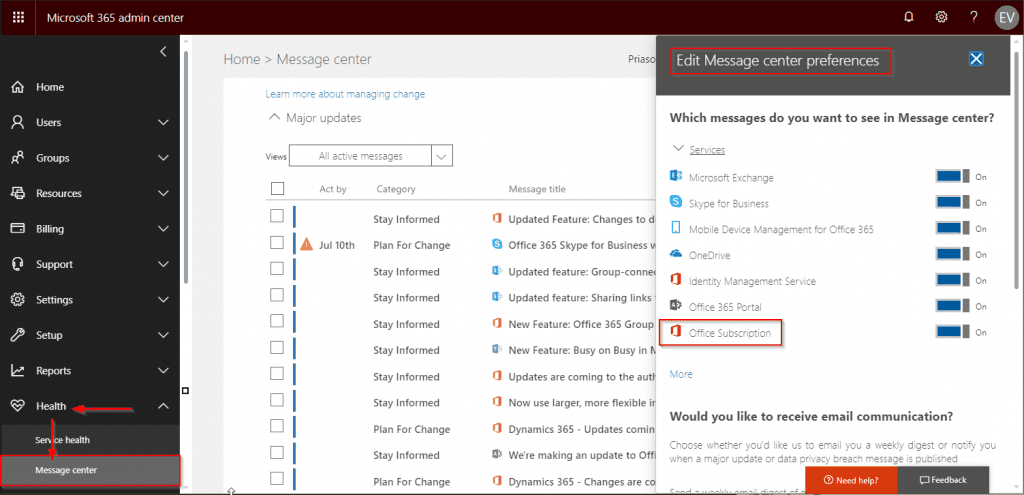
We suggest all customers of Office 365 to continually review the “Message Center” messages that are posted as well as the “Service Health” advisories. Many changes to Office 365 are announced thru the Message Center, but many changes that can have considerable impact on the enterprise are not announced with any loud or attention-grabbing fanfare. In addition, given that Microsoft may announce changes that are many years in advance of the actual change, such announcements will fall out of view in a few months.
Here are some of the specific details regarding the changes that are scheduled for the latter half of 2020:
Priasoft, a Microsoft Partner, offers enterprise-class solutions for Exchange migration, management, and eDiscovery. Supporting Exchange 2010, 2013, 2016, 2019, and Office 365/Exchange Online, our platform enables secure migration, management, and organization of email data, with advanced tools for compliance, public folder analysis, and AI-driven insights.